แก้ไขอาการแฟลชรอมไม่ผ่านก่อนเปลี่ยน NAND Flash
20:57
หลังจากที่หลายท่านได้ลองแฟลชรอมหลายตัวแล้วปรากฏว่าไม่มีรอมตัวไหนผ่านได้เลย หรือขึ้นตามภาพ
ท่านสามารถดาวน์โหลดไฟล์ด้านล่างแล้วลองแฟลชอีกครั้งก่อนทำการเปลี่ยน Nand flash ใหม่
Download
*หากแฟลชไม่ยังไม่ผ่านให้ทำเช็คหรือเปลี่ยน เม็ด NAND ใหม่
:Copy มาจาก เก็บไว้อ่าน
http://droidmaxthai.blogspot.com/search/label/%E0%B8%A5%E0%B9%89%E0%B8%B2%E0%B8%87%20Nand%20Flash
All Secret Codes of Android Phone
20:50
This Code is Very Sensetive, so Use these carefully. Or You lost your phone Settings or more.
General Codes:
*#06# – Display’s IMEI number.
*2767*3855# – This code will Format your device to factory state (will delete everything on a phone).
*#*#4636#*#* – Display’s Phone information, usage statistics and battery.
*#*#273282*255*663282*#*#* – This code will Immediately the backup of all media files.
*#*#197328640#*#* – This code will Enable test mode for the service.
*#*#1111#*#* – Will display FTA software version.
*#*#1234#*#* – Will show PDA and firmware version.
*#*#232339#*#* – Wireless LAN tests.
*#*#0842#*#* – This code is used for Backlight/vibration test.
*#12580*369# – Display’s Software and hardware info.
*#*#2664#*#* – This code is used for Testing the touchscreen.
*#9900# – System dump mode.
*#9090# – Diagnostic configuration.
*#*#34971539#*#* – Will display Detailed camera information.
*#872564# – USB logging control.
*#301279# – HSDPA/HSUPA Control Menu.
*#7465625# – This code will display phone’s lock status.
*#0*# – Enter the service menu on newer phones like Galaxy S III.
*#*#7780#*#* – Reset the /data partition to factory state.
Basic Codes:
*#*#7780#*#* – This code is used for factory restore setting.This will remove Google account setting and System and application data and settings.
*2767*3855# – This code is used for factory format, and will remove all files and settings including the internal memory storage. It will also re install the firmware.
*#*#4636#*#* – This code show information about your phone and battery.
*#*#273283*255*663282*#*#* – This code opens a File copy screen where you can backup your media files e.g. Images, Sound, Video and Voice memo.
*#*#197328640#*#* – This code can be used to enter into Service mode. You can run various tests and change settings in the service mode.
*#*#7594#*#* – This code enable your "End call / Power" button into direct power off button without asking for selecting any option(silent mode, Aero plane and power-off).
*#*#8255#*#* – This code can be used to launch G Talk Service Monitor.
*#*#34971539#*#* – This code is used to get camera information. Please avoid update camera firmware option.
W-LAN, GPS and Bluetooth Test Codes:
*#*#232339#*#* OR *#*#526#*#* OR *#*#528#*#* – W-LAN test (Use “Menu” button to start various tests).
*#*#232338#*#* – Shows WiFi MAC address.
*#*#1472365#*#* – GPS test.
*#*#1575#*#* – Another GPS test.
*#*#232331#*#* – Bluetooth test.
*#*#232337#*# – Shows Bluetooth device address.
Codes to launch various Factory Tests:
*#*#0842#*#* – Device test (Vibration test and BackLight test).
*#*#0588#*#* – Proximity sensor test.
*#*#0*#*#* – LCD test.
*#*#2664#*#* – Touch screen test.
*#*#2663#*#* – Touch screen version.
*#*#0283#*#* – Packet Loopback.
*#*#0673#*#* OR *#*#0289#*#* – Melody test.
*#*#3264#*#* – RAM version.
Code for firmware version information:
*#*#1111#*#* – FTA SW Version.
*#*#2222#*#* – FTA HW Version.
*#*#44336#*#* – PDA, Phone, CSC, Build Time, change list number.
*#*#4986*2650468#*#* – PDA, Phone, H/W, RFCallDate.
*#*#1234#*#* – PDA and Phone.
ที่มา: google
General Codes:
*#06# – Display’s IMEI number.
*2767*3855# – This code will Format your device to factory state (will delete everything on a phone).
*#*#4636#*#* – Display’s Phone information, usage statistics and battery.
*#*#273282*255*663282*#*#* – This code will Immediately the backup of all media files.
*#*#197328640#*#* – This code will Enable test mode for the service.
*#*#1111#*#* – Will display FTA software version.
*#*#1234#*#* – Will show PDA and firmware version.
*#*#232339#*#* – Wireless LAN tests.
*#*#0842#*#* – This code is used for Backlight/vibration test.
*#12580*369# – Display’s Software and hardware info.
*#*#2664#*#* – This code is used for Testing the touchscreen.
*#9900# – System dump mode.
*#9090# – Diagnostic configuration.
*#*#34971539#*#* – Will display Detailed camera information.
*#872564# – USB logging control.
*#301279# – HSDPA/HSUPA Control Menu.
*#7465625# – This code will display phone’s lock status.
*#0*# – Enter the service menu on newer phones like Galaxy S III.
*#*#7780#*#* – Reset the /data partition to factory state.
Basic Codes:
*#*#7780#*#* – This code is used for factory restore setting.This will remove Google account setting and System and application data and settings.
*2767*3855# – This code is used for factory format, and will remove all files and settings including the internal memory storage. It will also re install the firmware.
*#*#4636#*#* – This code show information about your phone and battery.
*#*#273283*255*663282*#*#* – This code opens a File copy screen where you can backup your media files e.g. Images, Sound, Video and Voice memo.
*#*#197328640#*#* – This code can be used to enter into Service mode. You can run various tests and change settings in the service mode.
*#*#7594#*#* – This code enable your "End call / Power" button into direct power off button without asking for selecting any option(silent mode, Aero plane and power-off).
*#*#8255#*#* – This code can be used to launch G Talk Service Monitor.
*#*#34971539#*#* – This code is used to get camera information. Please avoid update camera firmware option.
W-LAN, GPS and Bluetooth Test Codes:
*#*#232339#*#* OR *#*#526#*#* OR *#*#528#*#* – W-LAN test (Use “Menu” button to start various tests).
*#*#232338#*#* – Shows WiFi MAC address.
*#*#1472365#*#* – GPS test.
*#*#1575#*#* – Another GPS test.
*#*#232331#*#* – Bluetooth test.
*#*#232337#*# – Shows Bluetooth device address.
Codes to launch various Factory Tests:
*#*#0842#*#* – Device test (Vibration test and BackLight test).
*#*#0588#*#* – Proximity sensor test.
*#*#0*#*#* – LCD test.
*#*#2664#*#* – Touch screen test.
*#*#2663#*#* – Touch screen version.
*#*#0283#*#* – Packet Loopback.
*#*#0673#*#* OR *#*#0289#*#* – Melody test.
*#*#3264#*#* – RAM version.
Code for firmware version information:
*#*#1111#*#* – FTA SW Version.
*#*#2222#*#* – FTA HW Version.
*#*#44336#*#* – PDA, Phone, CSC, Build Time, change list number.
*#*#4986*2650468#*#* – PDA, Phone, H/W, RFCallDate.
*#*#1234#*#* – PDA and Phone.
ที่มา: google
Root i mobile i style 1 โดยโปรแกรมunlockroot
00:45
Root i mobile i style 1 โดยโปรแกรม unlockroot
เป้าหมายก็ไปเสียตังซื้อมันมาก่อน ทบความ ราคาโค-ตา-ระ แพงเลยนะนี้ 555
http://www.siamphone.com/en/i-mobile/i-style_1.htm
ก่อนอื่นลง Driver มันก่อนนะครับ คือพอเสียบมือถือเข้ากับ comp เสร็จแล้วมันจะวิ่งไห้ลง driver
เลยก็กด nextๆ ลงไห้มันไป
ลองทำดูนะครับ ทำรอบแรกไม่ผ่านก็ ทำต่อไปอีก จนก่าวมันจะผ่านนั้นแหละ
โดยการปิดมือถือแล้วเปิดใหม่แล้วลองทำตามขั้นตอนเดิมอีกรอบ
VDO สาธิตครับ
แต่ไม่มีรุปตอน ใช้โปร unlockroot root นะครับเพราะมันทำได้ครั้งเดียวผมไม่ใด้อัดไว้
เอาเป็นว่าลองกดทำๆดูเฮาะครับ อย่างมากมันก็ root ไม่ผ่านเท่านั้นแหละเครื่องไม่เสียหรอก
http://www.unlockroot.com/
ถ้าทำตามนี้แล้วไม่ผ่านก็ใช้ตัวนี้ดูครับ
ZhuoDaShi Root
http://www.pdamobiz.com/forum/forum_posts.asp?TID=598357&PN=1
ปล.ถ้าทำมันเสียจริงๆเปิดไม่ขึ้นก็ส่งร้านซ่อมเลยครับแล้วก็ทำหน้างงๆ บอกเจ้าของร้านไปว่า พี่อยู่ๆมันก็เปิดไมขึ้นอะฮีฮี เอาหน่าหัด Root ไว้ก่อนเพื่อความรู้เราจะให้หัดแค็กโปรแกรม พวก .apk ใด้ต่อไปในไม่ช้าอุอุ
เป้าหมายก็ไปเสียตังซื้อมันมาก่อน ทบความ ราคาโค-ตา-ระ แพงเลยนะนี้ 555
http://www.siamphone.com/en/i-mobile/i-style_1.htm
ก่อนอื่นลง Driver มันก่อนนะครับ คือพอเสียบมือถือเข้ากับ comp เสร็จแล้วมันจะวิ่งไห้ลง driver
เลยก็กด nextๆ ลงไห้มันไป
ลองทำดูนะครับ ทำรอบแรกไม่ผ่านก็ ทำต่อไปอีก จนก่าวมันจะผ่านนั้นแหละ
โดยการปิดมือถือแล้วเปิดใหม่แล้วลองทำตามขั้นตอนเดิมอีกรอบ
VDO สาธิตครับ
แต่ไม่มีรุปตอน ใช้โปร unlockroot root นะครับเพราะมันทำได้ครั้งเดียวผมไม่ใด้อัดไว้
เอาเป็นว่าลองกดทำๆดูเฮาะครับ อย่างมากมันก็ root ไม่ผ่านเท่านั้นแหละเครื่องไม่เสียหรอก
http://www.unlockroot.com/
ถ้าทำตามนี้แล้วไม่ผ่านก็ใช้ตัวนี้ดูครับ
ZhuoDaShi Root
http://www.pdamobiz.com/forum/forum_posts.asp?TID=598357&PN=1
ปล.ถ้าทำมันเสียจริงๆเปิดไม่ขึ้นก็ส่งร้านซ่อมเลยครับแล้วก็ทำหน้างงๆ บอกเจ้าของร้านไปว่า พี่อยู่ๆมันก็เปิดไมขึ้นอะฮีฮี เอาหน่าหัด Root ไว้ก่อนเพื่อความรู้เราจะให้หัดแค็กโปรแกรม พวก .apk ใด้ต่อไปในไม่ช้าอุอุ
เช็ตค่าบูตเข้า winxp เป็นDef
23:08
sudo gedit /boot/grub/grub.cfg
ต้องการตัวใหนบูตตัวแรกก็ตั้งเลขตัวนั้นเลยจ๊ะ
ที่มา:http://ubuntuguide.net/3-ways-setting-xpvistawindows-7-as-default-bootup-os-in-grub-2
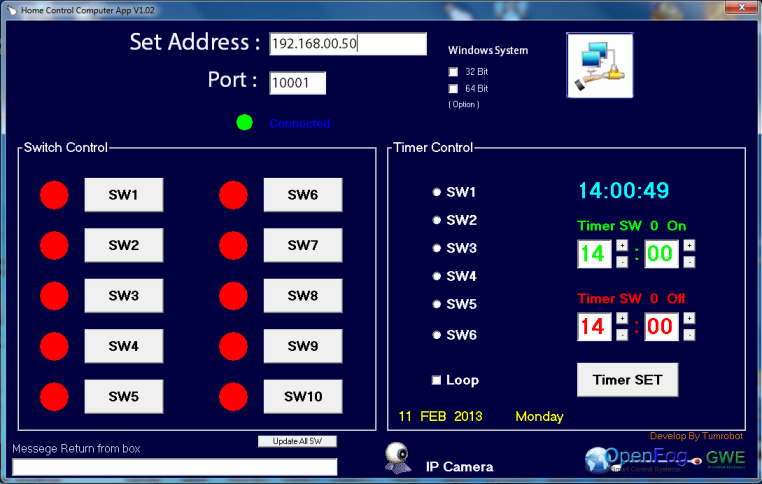
ควบคุมเครื่องใช้ไฟฟ้า ด้วย Android ผ่าน Ethernet V2
23:51
ไม่ใด้ทำเองหลอกคะ
เห็นแล้วดูว่ามันหน้าสนใจดีและสร้างใด้ไม่ยากเคดิตก็ของ ท่าน tumrobot คนในเว็บนั้นแหละคะ Copy เก็บไว้อ่าน
Web Control of Raspberry Pi GPIO
19:22
Download File
รวบรวมมาจาก:http://www.instructables.com/id/Web-Control-of-Raspberry-Pi-GPIO/